
Size at a glance
See file sizes and calculated folder sizes in icon view.
Open source for macOS
Add file and folder sizes, media dimensions, and folder counts in Icon View without opening Get Info.
Requires macOS 14 or later
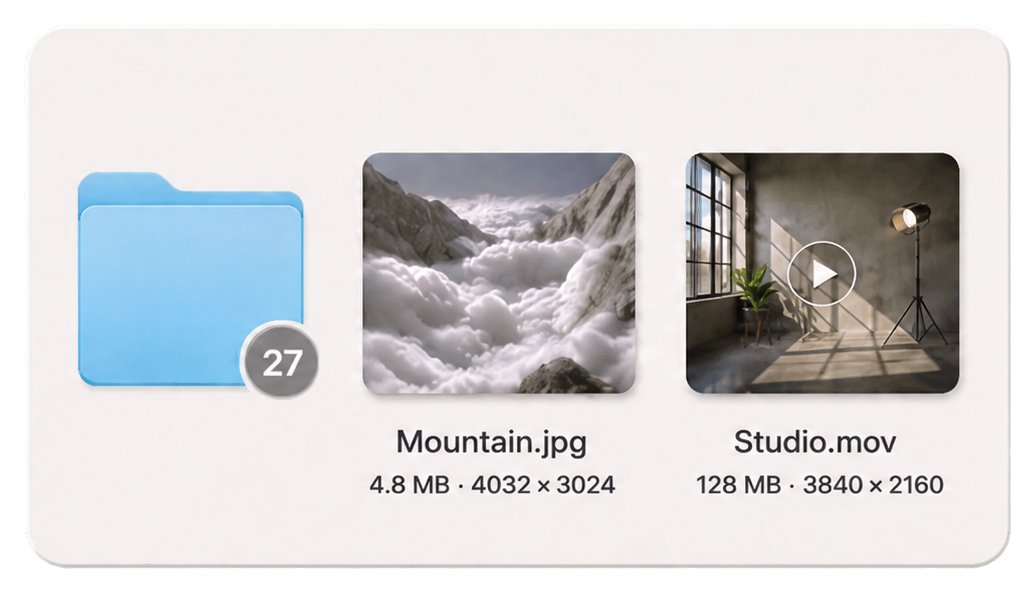
More context for every file and folder.
The extra layer
HaloLayer extends macOS Finder Icon View with the file metadata Finder normally keeps inside Get Info or other views.
See file sizes and calculated folder sizes in icon view.
Read image and video resolution in icon view.
Small circular badges show the immediate item count inside a folder.
Privacy First
HaloLayer reads Finder geometry and local metadata only to draw the information you choose. There are no accounts, analytics, uploads, or remote processing.
Download
Get the ready-made macOS app, or source code on GitHub.
macOS 14 or later
Open the DMG, drag HaloLayer into Applications, eject the disk image, and follow the included first-launch guide.
This beta version is not yet Developer ID signed or notarized. After the first launch attempt, use the included Open Privacy & Security shortcut and choose Open Anyway → Open. Never disable Gatekeeper globally.
First-time guide
No Terminal, code, or GitHub knowledge needed.
Double-click HaloLayer-v0.1.1.dmg in Downloads.
Drag HaloLayer onto the Applications shortcut, then eject the HaloLayer disk image. The source remains visible in the DMG until it is ejected—that is normal macOS copy behavior.
If macOS blocks the app, double-click Open Privacy & Security in the DMG and choose Open Anyway → Open. Never disable Gatekeeper globally.
Turn on HaloLayer under Accessibility and allow Finder access when macOS asks. These permissions let it locate icons and identify the current folder.
Click the halo in your menu bar. Toggle file size, resolution, and folder badges independently. Open Finder in Icon View to see them.
Supported Finder view: HaloLayer adds metadata overlays to Icon View. It does not modify List, Column, or Gallery View. If nothing appears, confirm Icon View and Accessibility access are enabled.
Ask for help ↗HaloLayer
HaloLayer is an independent open-source project and is not affiliated with or endorsed by Apple Inc. macOS and Finder are trademarks of Apple Inc.